
Silhouette Town1.2 - Google Play
You'll be able to see results in few seconds.
Publisher Description
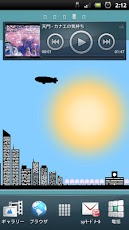
This live wallpaper was expressed in the silhouette of
the cityscape of relaxed atmosphere.
In the production of quiet atmosphere,
you can enjoy all year long without getting tired.
[Basic Operation]
・Time
Time of the city, this is linked with the terminal of your time.
Sunrise and sunset time zone has to change between January to December real.
・Weather
The city's weather varies, depending on time and seasonal.
Normally even if it is raining, you may decide that the snow in the winter.
・Event Calendar
The city is sensitive to the event.
Views of the city and also changes the seasons change.
[April:Sakura]
The lush cherry trees near the school
[July and August:FireWorks]
Fireworks at night will increase the
[September to November:Maple]
To bright orange trees near the school
[October:Halloween]
To Western-style schools, the surrounding trees and deadwood,
Rumor also what appear to be ghosts and witches.
[December:Christmas]
At night, illumination is decorated with trees and big tree
in the city outskirts near the school.
Santa Claus in the sky also fly.
・Other
ON / OFF display, such as an airplane flying in the sky can be set freely.
The time of day and weather can be freely set from the configuration.
Various events can be set freely, but not limited to the season.
Fully compatible with high-resolution terminal!
Corresponding to the side screen!
[setting]
Home> Menu> Wallpaper> Live Wallpaper
[Language]
English,Japanese
About Silhouette Town
The company that develops Silhouette Town is KSK_R. The latest version released by its developer is 1.2.
To install Silhouette Town on your Android device, just click the green Continue To App button above to start the installation process. The app is listed on our website since 2013-05-25 and was downloaded 0 times. We have already checked if the download link is safe, however for your own protection we recommend that you scan the downloaded app with your antivirus. Your antivirus may detect the Silhouette Town as malware as malware if the download link to com.r3x.silhouettetown is broken.
How to install Silhouette Town on your Android device:
- Click on the Continue To App button on our website. This will redirect you to Google Play.
- Once the Silhouette Town is shown in the Google Play listing of your Android device, you can start its download and installation. Tap on the Install button located below the search bar and to the right of the app icon.
- A pop-up window with the permissions required by Silhouette Town will be shown. Click on Accept to continue the process.
- Silhouette Town will be downloaded onto your device, displaying a progress. Once the download completes, the installation will start and you'll get a notification after the installation is finished.
Program Details
System requirements
Download information
Pricing
Version History
version 1.2
posted on 2013-05-25
version 1.2
posted on 2013-05-25
Several fixes and updates
Disclaimer
Official Google Play Link
We do not host Silhouette Town on our servers. We did not scan it for viruses, adware, spyware or other type of malware. This app is hosted by Google and passed their terms and conditions to be listed there. We recommend caution when installing it.
The Google Play link for Silhouette Town is provided to you by apps112.com without any warranties, representations or guarantees of any kind, so access it at your own risk.
If you have questions regarding this particular app contact the publisher directly. For questions about the functionalities of apps112.com contact us.
